AWS’s own guardrail blocked my budget alerts
Setting up a budget alert is the first thing you do on a new AWS account. On mine, AWS itself wouldn’t let the alert reach me.
- Area
- AWS · Billing
- Project
- AWS cloud homelab
What I saw
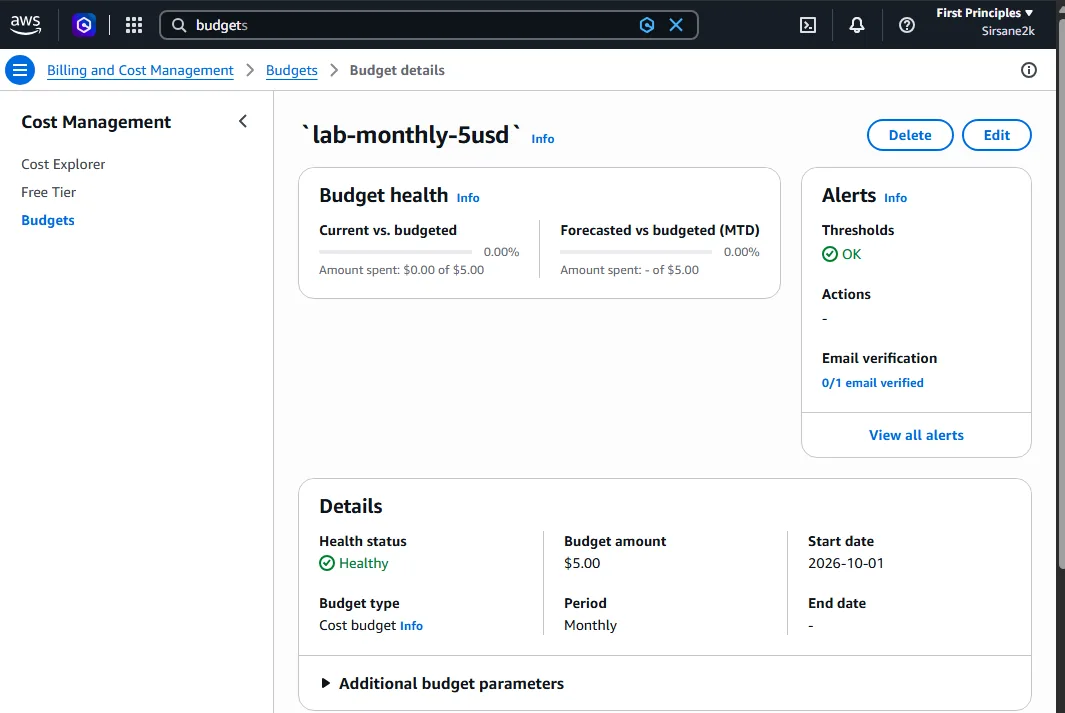
I created a US$5 monthly budget with an email alert before building anything. The email recipient stayed at Inactive, and clicking Send verification failed with a message that I had no permission for notifications-contacts:*.
Why it happened
Since 30 September 2026, AWS Budgets verifies new email recipients before it sends to them. My account is one of AWS’s new-style projects, which come with a service control policy (SCP) managed by AWS. That SCP has a DenyNotificationContactsOperations statement, so the verification call was denied above my account, no matter what my own permissions allowed.
How I found it
I matched the denied action in the error to the list of statements on AWS’s page about the SCPs applied to projects. Retrying, or giving myself more IAM permissions, could never have worked: an SCP deny wins over any allow.
The fix
I sent the alerts through an SNS topic, budget-alerts, instead. Its access policy lets only AWS Budgets, for my account, publish to it. I subscribed my email to the topic, confirmed the subscription and sent a test message to prove alerts can actually reach me.
Lesson: a guardrail above the account can block a console button. When the deny comes from an SCP, look for another path, here SNS, instead of retrying.